Introduction
I’ve been daily-driving Linux as my main operating system for the last two years, with most of that time being spent between either Fedora or Arch Linux. Recently however, I made the decision to migrate my entire system configuration over to NixOS. In this article, I want to highlight both the personal reasons and the technological reasons for this decision, as well as discuss the process of doing this migration.
Why Nix?
NixOS had been on my radar for a while before I switched over. I had seen a lot of people singing the praises of its declarative package management system, as well as how your entire setup including your dotfiles can live together as a couple of files instead of being scattered all across the Linux filesystem (not to mention Nix making things such as SystemD units or cron jobs a breeze as well).
NixOS is also unique in how it’s package manager is considered “system agnostic” meaning that a Nix configuration file not only works on NixOS, but on any computer running the Nix package manager (which can be installed on any Linux distribution, BSD, or even macOS). What this means is I can create a nix “flake” with a set of configurations and packages defined within in, send it over to my friend who is using a Mac and he can load up my flake using the nix-darwin utility and do development with the same package versions I’m using on my end. In this way, Nix behaves very similar to dev containers.
Another benefit of NixOS is the fact that it is part of a very small group of Linux distributions which are “atomic”, meaning that it’s much more difficult to brick a NixOS Linux system compared to an Arch or even Fedora Linux system, because NixOS will only apply changes to your system (such as new configurations, packages, etc.) only if the entire change can be applied, otherwise it will fail. For someone like me who uses his laptop for everything (school, work, business) this was a big deal for me. And sure, while Fedora may have their own atomic variants, they typically force you to use Flatpaks instead of rpm packages, which brings me to the big selling point.
Nix is the new King of package managers
For a long time, the answer was simple. If you wanted the freshest packages for Linux as well as the most system native packages available without having to use Flatpak or Snap, pacman from Arch Linux was the obvious choice. Combined with the Arch User Repository (AUR) it was the gold standard for packages, as anyone could package up a program and distribute it. However, there was some drawbacks. By nature, the AUR isn’t vetted by developers which has led to some security nightmares in the past. As of the writing of this article, the AUR is still dealing with the ramifications of the Atomic Arch security compromise is still wreaking havoc on the AUR. This was also the first AUR hack to be assisted by LLMs, which means that unfortunately as these programs only get more capable of security auditing (such as Claude’s Fable model) that these hacks will only get more common.
In contrast, the Nix package manager also allows fresh, bleeding-edge packages like Arch, but the packages are vetted before being released to the repositories. Nix also allows different version branches of packages (currently the options are 25.11, 26.05, and unstable for the Nix package manager). Additionally, Nix is now the largest repository of packages for Linux with over 115,000 packages available compared to Arch’s 90,000. This graph kinda sums it up better than I ever could:
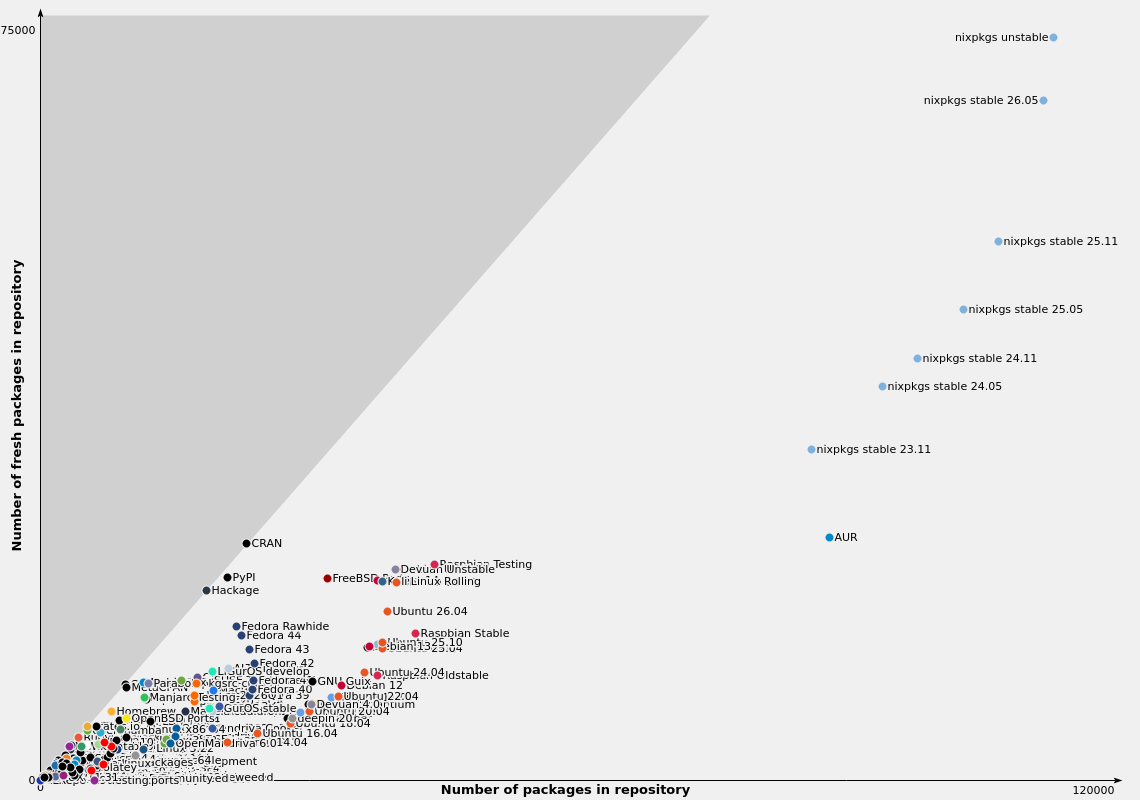
As you can see, Nix kinda has gone into it’s own league now with package availability. But what this means is that some packages that I used to have to built manually on my computer (even on Arch!) I can get natively from Nix, with the knowledge that it’s been vetted and approved by the community.
Nix also allows you to spawn what’s known as a “nix shell”. Nix shells serve as a way to create a shell with a program which only is on your system for the lifetime of the shell. Recently, I wanted to use Pi (a coding agent) so instead of installing it into my system, I just ran nix-shell -p pi-coding-agent to make the couple of changes I wanted/needed to my system, and the second I closed the terminal, Pi was gone.
Dotfiles, Dotfiles, Dotfiles…
Nix configurations can be as simple or as complicated as you want, however most systems build off of the following components:
configuration.nixwhich contains your main configurationhardware-configuration.nixwhich is autogenerated by the NixOS installed and contains your hardware specifications
However, the NixOS community has created some tools which I would argue are v ital to maximizing the use of NixOS. One of these tools is called Home Manager which allows the creation of home.nix and additional customization of Nix systems, such as allowing you to also include your dotfiles as part of your Nix configuration.
Oh, that’s another thing: Goodbye, GNU Stow! Nix allows you to either specify your configurations of applications in-file using their configuration language (MyNixOS is a phenomenal resource for all the settings you can use) or by importing your existing configuration files into your system. For example, instead of rewriting my entire Niri configuration from scratch in Nix syntax, I simply used the xdg.configFile."niri".source=./config/niri to import my Niri configuration into my system and just added my Niri dots as part of the repo.
Now, you didn’t think I just brought over all of my old dots, did you? I’ve recently been disatisfied with my Waybar/Mako/Fuzzel setup, so I started experimenting with Noctalia Shell as my new notification daemon, bar, and app launcher and I have to say with the recent v5 release of Noctalia I think I’ll be dailying this now in place of my old, more complicated configuration.
Home Manager’s also allows you to define custom “modules” which contain packages/configurations/whatever which you can then import to create the complete system. For example, I have modules for development, gaming, music production, among others and if I want to add a module to my configuration for my laptop, I only have to include it in my import[]; statement inside the home.nix file.
Conclusion
NixOS does have some inital setup labor due to having to migrate from the more conventional package manager systems to the Nix declarative language, but once you get past that initial starting point Nix becomes one of the most powerful and complete package/configuration managers on the planet.